
Alliance System Guide for Last Asylum Plague
Table of contents
- Alliance System Guide for Last Asylum Plague
- 🤝 Why Join an Alliance?
- 🔎 How to Join an Alliance
- Alliance Discord Requirements & Bots
- ✅ Choosing the Right Alliance
- 📊 Signs of Activity
- Alliance Features
- Important Gift-Level Unlocks
- 🏘️ Alliance Hive Strategy
- 📍 Hive Etiquette
- ✅ Daily Alliance Routine
- 🌟 Be a Valuable Member
- Alliance Events & Coordinated Activities
- Alliance Ranks & Officer Responsibilities
- Alliance Rank Hierarchy (R1 – R5)
- Alliance Management Guide: Promotion Rules, Activity Audits & War Channels
- 2. Activity Audits & Roster Maintenance
- 3. War Channel & Discord Structure
- Kingdom Governance, NAP Rules & Minister Requests
- Related Alliance & Progression Guides
- Alliance Management Final Tip
Browse all game guides, items and systems, or the events hub.
Alliances are one of the most important parts of progression in Last Asylum: Plague. Joining an active group provides access to shared bonuses, cooperative events, rallies, territory warfare, development assistance, shops, gifts, and experienced players who can help you make better decisions.
You can progress alone, but alliance membership makes many systems faster and more rewarding. A well-organized alliance can improve both individual growth and the strength of every member through regular participation and coordinated strategy.
🤝 Why Join an Alliance?
Alliance membership unlocks cooperative systems that are unavailable or less effective when playing alone.
- Cooperative gameplay: Complete alliance tasks, activities, and events with other members.
- Combat support: Join rallies, coordinate attacks, reinforce objectives, and fight as a group.
- Faster development: Receive Alliance Help on eligible construction, research, and other timers.
- Shared progression: Benefit from Alliance Technology and other alliance-wide systems.
- Additional rewards: Earn Alliance Points, gifts, event rewards, and shop items.
- Communication: Share information, strategies, warnings, and event instructions.
🔎 How to Join an Alliance
The Alliance feature becomes available at Sanctuary Level 5.
- Open the Alliance menu from the main game screen.
- Browse the recommended alliances or search for a specific name or ID.
- Review the alliance's requirements, language, activity expectations, and focus.
- Submit an application or join immediately when permitted.
Open alliances accept eligible players automatically. Approval-required alliances require leadership to review the application first. After joining, relocate or complete any onboarding steps requested by leadership.
Alliance Discord Requirements & Bots
There are a lot of players and bots out there that are trying to scam you. Do NOT give out your Discord information unless you somewhat know them. Yes, they can play the game and respond, but they are trying to make money off of you. Be careful! Go to the Kingdom Chat and figure out who to join.
✅ Choosing the Right Alliance
The strongest alliance on the rankings is not automatically the best match. Look for a group whose expectations fit the way you play.
- Activity: Check chat, online membership, event participation, and how often inactive players are removed.
- Goals: Decide whether you want a casual group, a development-focused alliance, or a competitive territory and event alliance.
- Requirements: Confirm minimum Might, daily participation, donations, attendance, and relocation rules.
- Communication: A shared language and reliable communication channel make coordination much easier.
- Organization: Clear leadership, event plans, map markers, and timely announcements are signs of a functional alliance.
- Schedule: Make sure major event times align with when you can actually participate.
📊 Signs of Activity
- Regular chat and announcements
- Many active members
- Frequent Alliance Help
- Daily technology donations
- Organized event attendance
- Consistent rallies and group activity
- Clear hive and territory plans
An active mid-ranked alliance can provide a better experience than a powerful but poorly organized group.
Alliance Features
🔬 Alliance Technology
Alliance Technology provides shared bonuses that benefit alliance members. Players support its development through regular donations.
Technology bonuses may improve:
- Troop combat attributes
- Development speed
- Resource production
- Alliance event performance
Donate daily when possible. Donations help the alliance progress and award Alliance Points that can be spent in the Alliance Shop.
⏱️ Alliance Help
Alliance Help allows members to reduce eligible construction, research, and development timers.
- Request help after starting an eligible project.
- Press the Help button regularly to assist other members.
- Request help before using speedups whenever possible. Plan upgrades with the Research Lab Guide.
- Remain active so requests are completed promptly.
Each individual reduction may be small, but frequent assistance saves a considerable amount of time across an active alliance.
🛒 Alliance Shop
The Alliance Shop exchanges Alliance Points for useful progression items. Points can be earned through technology donations, alliance events, and other contributions.
Available items may include:
- Recruit tickets
- Construction speedups
- Development resources
- Other limited progression items
The inventory refreshes on Monday. Use the Shop Guide to compare priorities. Review each week's stock and prioritize scarce items that support your current goals rather than spending points simply because they are available.
🎁 Alliance Gifts
Alliance Gifts provide shared rewards generated by eligible activities, events, or purchases. When a gift becomes available, members can claim it through the alliance interface.
- Check the Gift screen regularly.
- Claim gifts before they expire.
- Active alliances generate gifts more frequently.
- Gift progress contributes to improved future rewards.
Individual gifts may appear modest, but the combined rewards from an active alliance accumulate quickly.
 Important Gift-Level Unlocks
| Level | Unlock | Benefit |
|---|---|---|
| 5 | Alliance Mail | R4 and higher can send mail to all alliance members. |
| 8 | Caravan Speed Boost | Increases Alliance Caravan travel speed by 10%. |
| 10 | R4 Expansion | Adds two R4 leadership positions. |
| 12 | Caravan Enhancement | Reduces Alliance Caravan heist attempts by one. |
| 15 | Claim All | Unlocks one-tap claiming for available gifts. |
| 16 | Caravan Defense | Allows an attacker to fail three consecutive Caravan attacks. |
| 20 | Caravan VIP | Allows the coachman to invite an alliance member to ride as a VIP. |
🏘️ Alliance Hive Strategy
A hive is a cluster of alliance bases positioned close together on the world map. Leadership may organize the hive near alliance territory, event objectives, or another strategically useful location.
A well-positioned hive provides several practical advantages:
- Shorter travel: Troops can reach nearby rallies, reinforcements, and objectives more quickly.
- Faster response: Members can react to attacks or event calls with less march time.
- Stronger coordination: A centralized position makes organized movement and target selection easier.
- Mutual defense: Nearby members can reinforce and support one another more efficiently.
- Event access: Strategic placement can reduce travel to important alliance activities.
Alliance Help is handled through the alliance interface and does not depend on map distance. The hive's main advantage is faster troop movement and stronger map coordination. See the Territory System Guide for planning around map objectives.
📍 Hive Etiquette
- Relocate to the assigned area.
- Follow leadership's layout.
- Avoid blocking key locations.
- Watch alliance markers.
- Move when the hive relocates.
- Reinforce only when requested.
- Report nearby threats.
Do not choose a hive position based only on personal convenience; poor placement can interfere with alliance strategy.
✅ Daily Alliance Routine
- Check alliance chat, mail, and markers.
- Press Alliance Help and request help on eligible projects.
- Make Alliance Technology donations.
- Claim available Alliance Gifts.
- Review Alliance Shop priorities.
- Complete alliance tasks and event attempts.
- Join scheduled rallies or defensive actions. Prepare your army with the Troop Training Guide.
- Follow hive, territory, and event instructions.
🌟 Be a Valuable Member
You do not need to be one of the strongest players to contribute. Reliable members help by:
- Logging in and completing daily contributions
- Reading and following instructions
- Attending important alliance events
- Joining appropriate rallies
- Sharing accurate information
- Supporting other members respectfully
Consistency, communication, and teamwork often matter more than raw Might.
Alliance Events & Coordinated Activities
Use the current in-game event calendar and alliance announcements to confirm availability, registration, eligibility, and start times. These guides cover activities where planning with your alliance is useful:
- Alliance Duel — Plan what to save and when to contribute.
- Undead Siege — Coordinate attendance and defensive preparation.
- Royal City Scramble — Review objectives before following leadership's battle plan.
- Kingdom War (KvK) — Prepare with the kingdom for cross-server competition.
- Canyon Conquest — Check the event guide and your assigned role.
- Hunt Battle and Cheese Trap — Review the relevant activity guide before participating.
- Caravan Trade and Raids — Review trade rewards and target restrictions.
- Elixir Scramble Guide - Registration, building buffs, and capture strategy.
For Wandering Phantom or activities not covered above, use the in-game instructions and Events hub. An event does not automatically suspend NAP protection: confirm permitted targets and the effective times in the kingdom's announcement before attacking.
Alliance Ranks & Officer Responsibilities
Clear responsibilities help an alliance coordinate recruitment, development, diplomacy, and combat. Use the R1–R5 hierarchy to organize the roster, and check the current in-game permissions before assigning duties.
- R5 — Alliance leader: Sets alliance priorities and appoints officers.
- R4 — Officers: Share operational duties such as recruitment, event planning, and diplomacy.
- R3 — Core members: A suggested category for reliable, experienced contributors.
- R2 — Active members: A suggested category for regular participants.
- R1 — New recruits: A suggested onboarding or trial category.
Member labels, promotion thresholds, and officer job descriptions below are examples of alliance policy. They do not automatically grant game permissions or kingdom-wide authority. Alliance officer roles are separate from the kingdom's minister titles.
Alliance Rank Hierarchy (R1 – R5)
| Rank | Title | Key Permissions & Responsibilities |
|---|---|---|
| R5 | Leader | Top Authority: Full administrative control. Appoints/demotes R4 Officers, sets server diplomacy (NAPs), manages territory, and transfers leadership if needed. |
| R4 | Officer | Operations & Execution: Accepts new members, kicks inactives (R1–R3), posts announcements, initiates alliance events (Undead Siege, Elixir Scramble), and manages Alliance Tech. |
| R3 | Elder | Core Veteran: Trusted active players who regularly lead or fill rallies. Leadership can use R3 as a roster-review category and manually protect reliable members during cleanups; rank alone should not be treated as automatic protection. |
| R2 | Member | Active Contributor: Main roster players who contribute daily to Alliance Tech donations, alliance helps, and Alliance Duel phase points. |
| R1 | Recruit | Probationary: New joins proving their daily activity and event participation before being promoted. |
Specialized R4 Officer Titles
The R5 Leader can assign specific operational roles to R4 Officers to streamline alliance management:
-
God of War – Combat Commander: Controls rally timings, target calls, and combat strategy during Alliance Duel Kill Days, Royal City Scramble, and Kingdom War (KvK).
-
Diplomat – Relations Manager: Coordinates Non-Aggression Pacts (NAPs) with neighboring top alliances, settles accidental attack disputes, and manages server politics.
-
Recruiter – Roster Manager: Screens incoming applications, recruits active players from world chat or Discord, and maintains target member counts.
-
Inspector – Event Tracker: Monitors member participation in Alliance Duel, tracks alliance tech donations, and flags inactive or non-compliant members.
-
Goddess – Community Leader: Keeps alliance chat active, welcomes new members, sends event reminders, and helps boost team morale.
Alliance Management Guide: Promotion Rules, Activity Audits & War Channels
Running a top-tier alliance in Last Asylum: Plague requires structure. Without clear rules for member ranks, systematic activity checks, and organized war communication, alliances collapse under burnout, drama, or unexpected losses during server events.
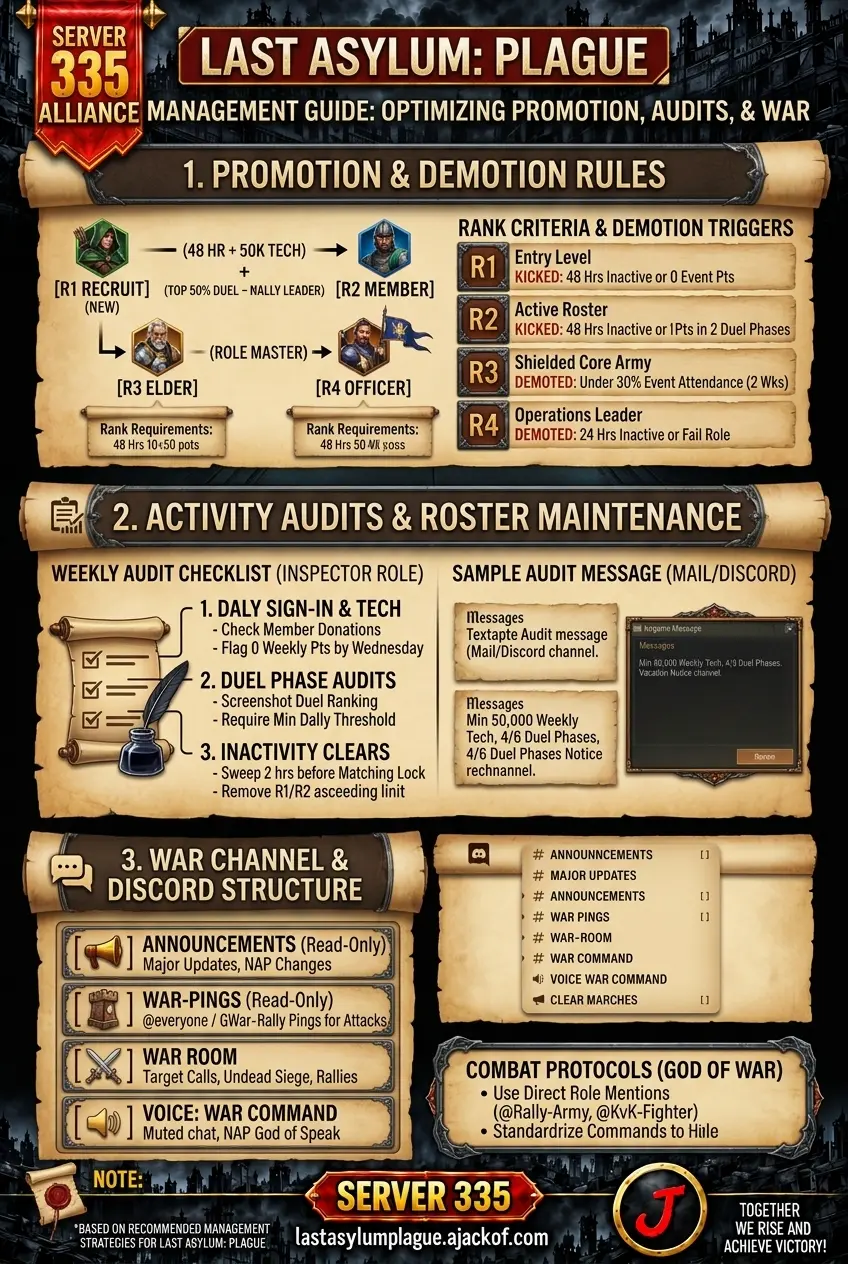
1. Promotion & Demotion Rules
The thresholds below are an example alliance policy, not automatic game requirements. Leaders should adapt them to server age, member schedules, and agreed expectations. Check current in-game rank permissions before assigning duties.
[R1 Recruit] (48 hrs + 50k Tech Points)
[R2 Member] (Top 50% Duel + Rally Leader)
[R3 Elder] (Role Master)
[R4 Officer]
Rank Criteria & Requirements
| Rank | Promotion Requirement | Main Purpose | Demotion / Kick Trigger |
|---|---|---|---|
| R1 (Recruit) | Entry level / New joins | Probationary: Trial period. | 48 hours inactive or zero event points during first week. |
| R2 (Member) | Complete 48 hours in alliance AND reach 50,000 Alliance Tech donation points. | Standard Active Roster: Contributes daily. | 48 hours inactive without notice, or 0 points in 2 consecutive Alliance Duel phases. |
| R3 (Elder) | Must reach Sanctuary Lv. 15+, rank in the top 50% of Alliance Duel scores, and actively join/lead rallies. | Core Roster: Leadership reviews reliable members individually; R3 does not provide automatic protection from removal. | Falling below 30% event attendance over two weeks. (Demoted to R2) |
| R4 (Officer) | Nominated by R5/R4 board. Must run Discord, manage an official role (e.g., God of War, Inspector), and maintain Sanctuary Lv. 18+. | Daily Operations: Leadership and event execution. | Inactivity for 24 hours without notice, or failing to execute assigned role responsibilities. (Demoted to R3) |
Golden Rules for Leaders
-
Never promote to R4 on request: R4 is a daily management role, not a status symbol. Only assign R4 when a player fulfills a specific duty (Recruiter, Inspector, God of War).
-
Protect your R3s: Use R3 as a safety buffer. When cleaning out inactives before Alliance Duel or Kingdom War (KvK), R4s should only kick from R1 and R2.
2. Activity Audits & Roster Maintenance
To maximize rewards in events like Alliance Duel and Undead Siege, officers should track participation, check approved absences, and discuss expectations before removing members.
The Weekly Audit Checklist (Inspector Role)
-
Daily Sign-In & Tech Check:
-
Open Alliance -> Tech -> Member Donations.
-
Flag anyone with 0 weekly donation points by Wednesday reset.
-
-
Alliance Duel Phase Audits:
-
At the end of each daily phase, screenshot or note the Alliance Duel Contribution Ranking.
-
Require a minimum daily threshold based on server progression (e.g., 100,000 points minimum per phase).
-
-
Inactivity Clears:
-
Review the current event rules and matching schedule before changing the roster; confirm any eligibility effects first.
-
Remove offline R1/R2 members exceeding the 24-hour limit (or 48-hour limit for mid-tier alliances) to make space for active applicants.
-
Sample Audit Message (In-Game Mail / Discord)
[NOTICE] Weekly Activity & Roster Clean-Up
Team, to keep our alliance in the Top 5 and maximize Alliance Duel rewards, we are running our weekly activity audit today before reset.
Minimum Requirements: 50,000 weekly Tech Donations & participation in at least 4/6 Alliance Duel phases.
Vacation Notice: If you will be offline for more than 24 hours due to real-life commitments, notify an R4/R5 or post in the #vacation-notice channel on Discord so your spot is saved.
3. War Channel & Discord Structure
In-game chat is notoriously slow during real-time combat events like Royal City Scramble, Elixir Scramble, and Kingdom War (KvK). Top alliances rely on structured Discord channels and clear notification protocols.
Recommended Discord Channel Setup
-
📢 #announcements (Read-Only) – Major alliance updates, NAP changes, and server policies.
-
🚨 #war-pings (Read-Only) – Reserved strictly for
@everyoneor@War-Rallypings when under attack or initiating major event rallies. -
🛡️ #event-schedules – Phase guides for Alliance Duel, start times for Undead Siege, and rally schedules.
-
⚔️ #war-room (R4/R5 Only) – Officer coordination for target calls, NAP negotiations, and recruitment discussions.
-
🔊 Voice Channel: "War Command" – Muted chat during active KvK operations; only the God of War and designated rally callers speak.
Combat Protocols for the God of War
-
Use Direct Role Mentions: Never tag
@everyonefor routine events. Create self-assignable Discord roles like@Rally-Armyor@KvK-Fighter. -
Standardize War Commands: Establish simple callouts during live battles:
-
"Reinforce [Coordinates]" – Max out garrison troops immediately.
-
"Shield Up!" – Instant peacetime shield protocol across alliance territory.
-
"Clear Marches" – Pull back all gathering troops to prevent free points for enemy alliances during Kill Days.
-
Kingdom Governance, NAP Rules & Minister Requests
Alliance leadership manages its own roster, while kingdom agreements govern relations between participating alliances. Keep a link to the current server constitution in alliance announcements and explain it during onboarding.
- Confirm NAP coverage. Check the published list of protected alliance and farm tags. Ranking in the Top 10 or Top 20 is not, by itself, proof of protection.
- Follow gathering rules. Confirm the kingdom's tile-claim policy, redirect when a protected gatherer already occupies a tile, and report collisions to leadership.
- Document disputes before retaliation. Send battle reports, coordinates, player names, alliance tags, and server time to R4/R5. Let leaders contact the other alliance and agree on a response.
- Check event exceptions. Publish eligible targets, restricted areas, and start/end times. Coordinate internally during Kingdom War instead of assuming every combat event allows internal attacks.
- Use the minister queue. Prepare resources and a free queue, request the appropriate available title through the designated channel, verify its current bonus in game, and notify the minister when finished.
Read the Kingdom Governance & Server Constitution Guide for the full NAP framework, event rules, dispute process, and minister request checklist.
Related Alliance & Progression Guides
- Alliance Guide — Explore alliance gifts and research.
- Territory System Guide — Plan around map objectives and hive placement.
- Troop Training Guide — Prepare troops for alliance activities.
- Barracks Soldier Capacity Guide — Review capacity issues when managing the army.
- Shop Guide — Compare spending priorities.
Alliance Management Final Tip
Choose an alliance that matches your schedule and goals. Donate, help, communicate, participate, and follow the published hive, event, and kingdom rules. Leaders should apply roster policies consistently, account for approved absences, and review event eligibility before removing or transferring members.