
How to Link and Transfer Your Account
Moving Last Asylum: Plague to another phone or tablet is straightforward—as long as your original game profile is linked to a login account first.
This guide explains how to bind your progress, sign in on another device, and avoid accidentally loading or linking the wrong character.
Before You Change Devices
Part 1: Bind the Account on Your Original Device
- Open the game on the device that currently contains your progress.
- Tap your Avatar or Profile picture in the upper-left corner of the main screen.
- Select Account, then open the User Center.
- Choose Bind Account.
- Select your preferred login method, such as Google Play, Apple ID, Facebook, or Email.
- Complete the authorization or verification process.
- Return to the User Center and confirm that the account shows as successfully linked.
Part 2: Sign In on the New Device
Download and open Last Asylum: Plague on the new device.
If the game automatically creates a new character, complete or skip only the minimum tutorial steps required to reach the profile settings. As soon as it will let you click the avatar. It's a little lengthy.
Open the Avatar/Profile menu.
Select Account, then open the User Center.
Click Swith Account button
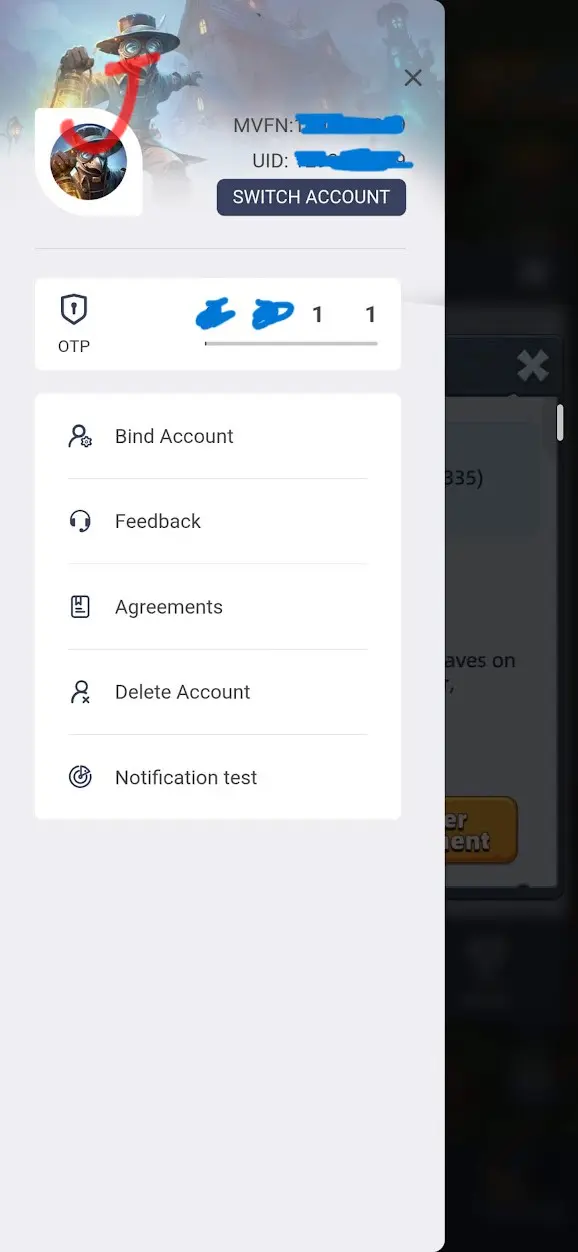
Sign in with the exact Google, Apple, Facebook, or Email account used during binding.
Confirm the account or character prompt.
Verify that your original character, Kingdom, Might, heroes, and progression have loaded.
Frequently Asked Questions
Can I play the same account on multiple devices?
You may be able to sign in on more than one compatible device, but avoid actively playing the same account on two devices simultaneously.
Will installing the game automatically restore my progress?
Not necessarily. You must sign in through the User Center using the login method connected to the original profile.
Can I transfer between Android and iPhone?
Cross-platform access depends on which login methods are available on both devices. Confirm compatibility before removing the game from the original device.
Should I bind a temporary new character?
No. Binding a new character to the wrong login may complicate recovery. Switch accounts first and load the original profile.